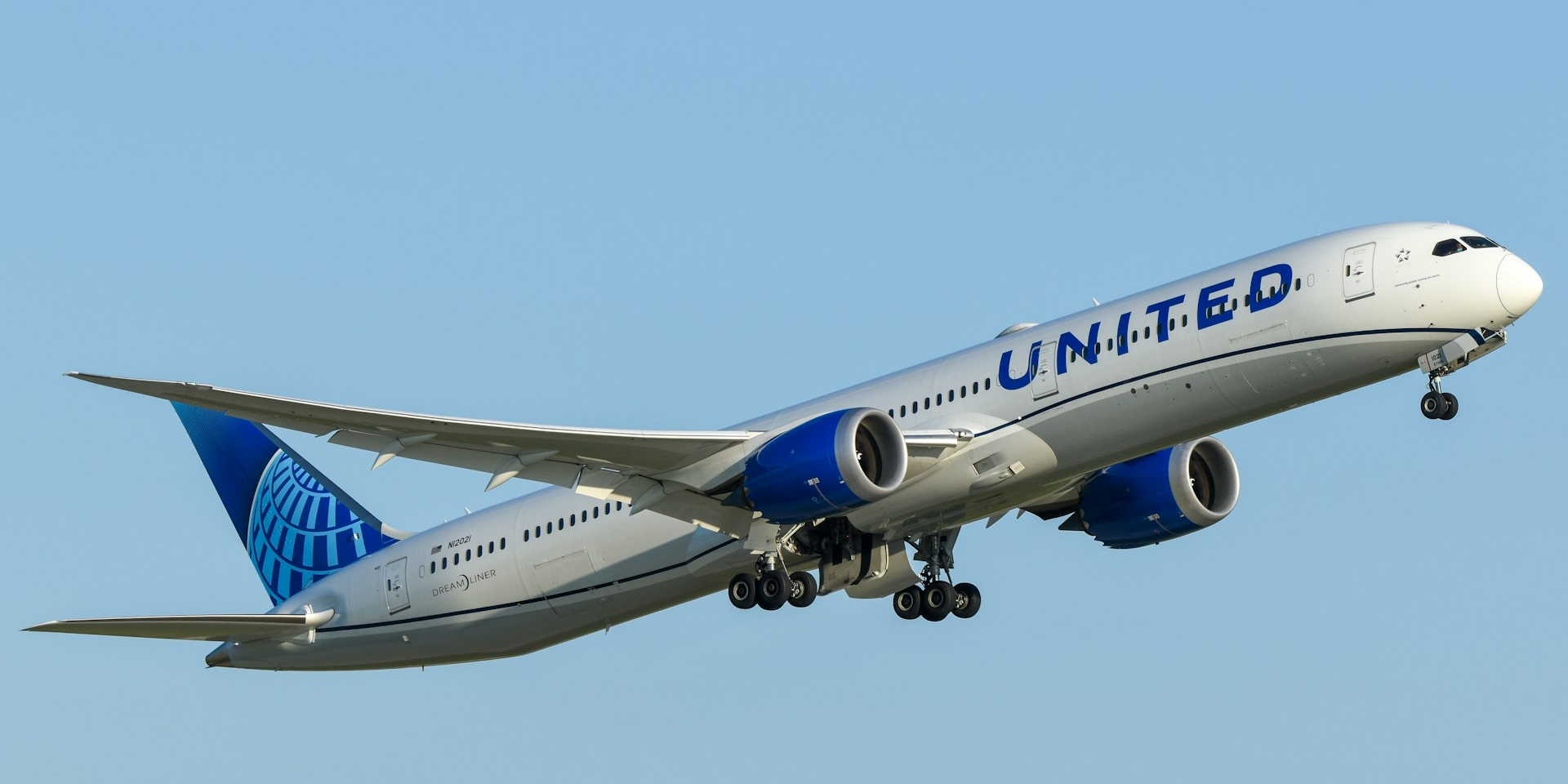



United.com has long been one of our favorite websites to search for award availability. While its functionality has changed over the years, it's still a handy way to search for awards – and if you're a United cardholder, it may be the only way to find the best deals to fly United itself.
But even if you're looking to fly one of United's many Star Alliance partner airlines, such as Lufthansa, SWISS, or ANA, United.com is a great place to start the search process, whether you plan to redeem United miles or use other miles to book the same flights.
There are a few drawbacks, such as the prices not updating in the calendar view when you adjust the filters, and a recent change requiring you to log in to search. Plus, it can be pretty slow … but if you prefer the familiarity of United's website, it has several features that make it one of the best ways to find the flights you can actually book with your points and miles.
Plus, the ability to transfer points from Bilt Rewards and Chase Ultimate Rewards to United makes it easier to get the miles you need to actually book.
Keep reading for a step-by-step guide on how to search and book flights with United miles, including how to uncover the best deals by holding a United credit card.
Step 1: Log In & Start an Award Search on Desktop
United now requires a log-in to search for award flights – a first for U.S airline programs. This means you'll need to create a free United MileagePlus account if you don't already have one.
When logging in, be prepared to enter two-factor authentication codes sent to you by text or email.
Once you're logged in, it's easy to start an award search from the homepage. We recommend using a desktop computer for this, if possible. The mobile version of airline sites can be difficult to navigate when searching for award availability.
Select “Book with miles” to search for award tickets and “Flexible dates” to see a monthly calendar view. It's easiest to search one-way at a time – even if you plan to book a roundtrip in the end.
Be sure to choose the total number of travelers and class of service you wish to book. And if you want those fancy lie-flat seats on international flights, choose “Business” class.
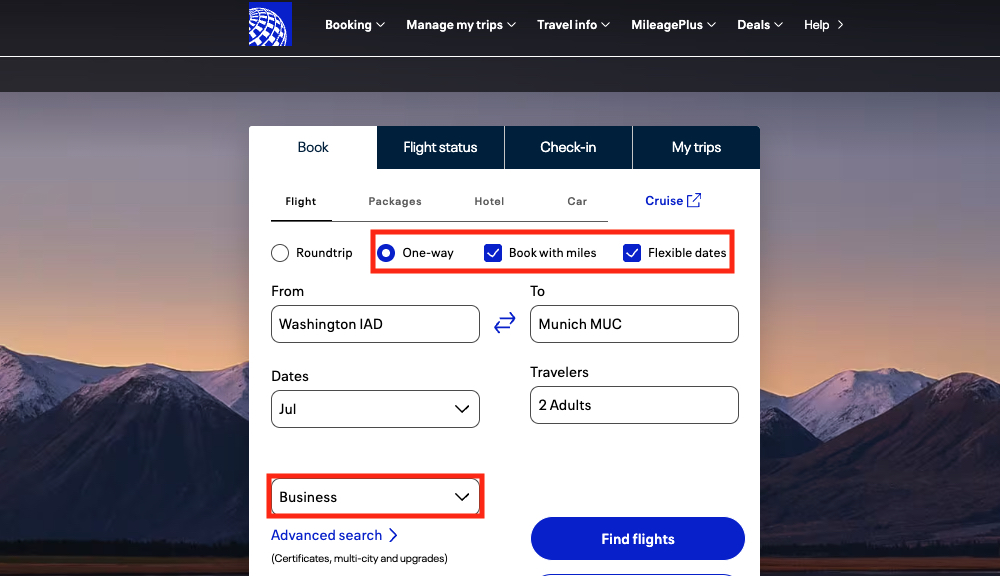
If you're searching with flexible dates, you'll choose a month to search rather than an exact date. Once you've entered all the search parameters, click “Find flights.”
Step 2: Scan the Calendar for the Cheapest Rates
United's calendar view is one of its best features, but it does have some quirks.
The ability to see a full month of prices at once is a great way to see which dates cost the fewest miles. You'll often see quite a range due to United's dynamic pricing on its own flights.
You can quickly scan the full calendar by clicking the arrows at the top to view the previous or next months.
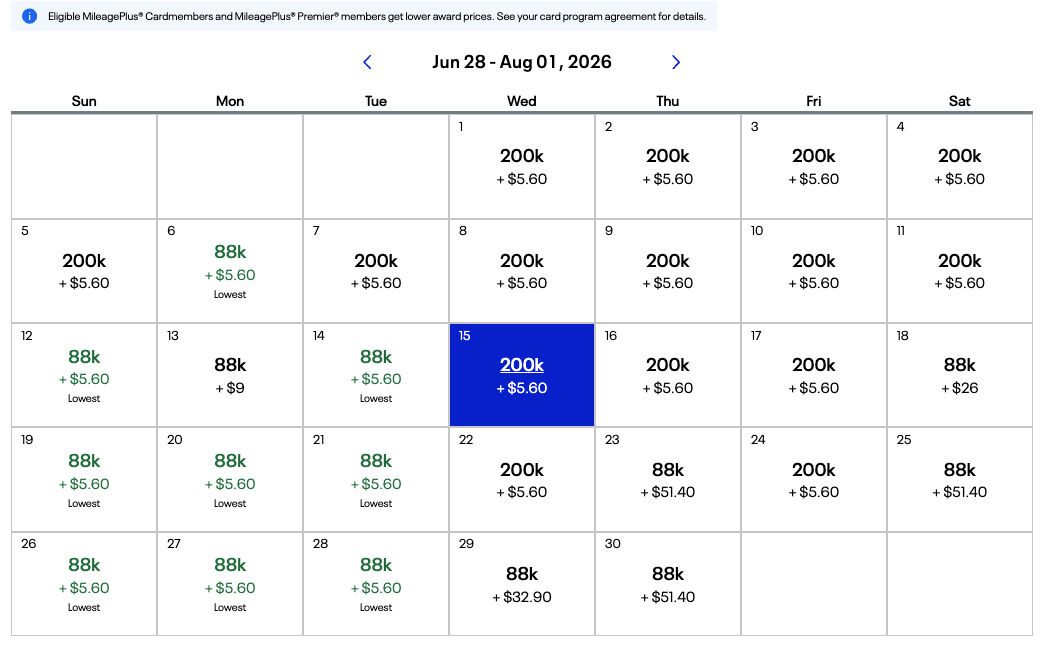
But it's important to note that there's no way to filter for only nonstop flights in the calendar view.
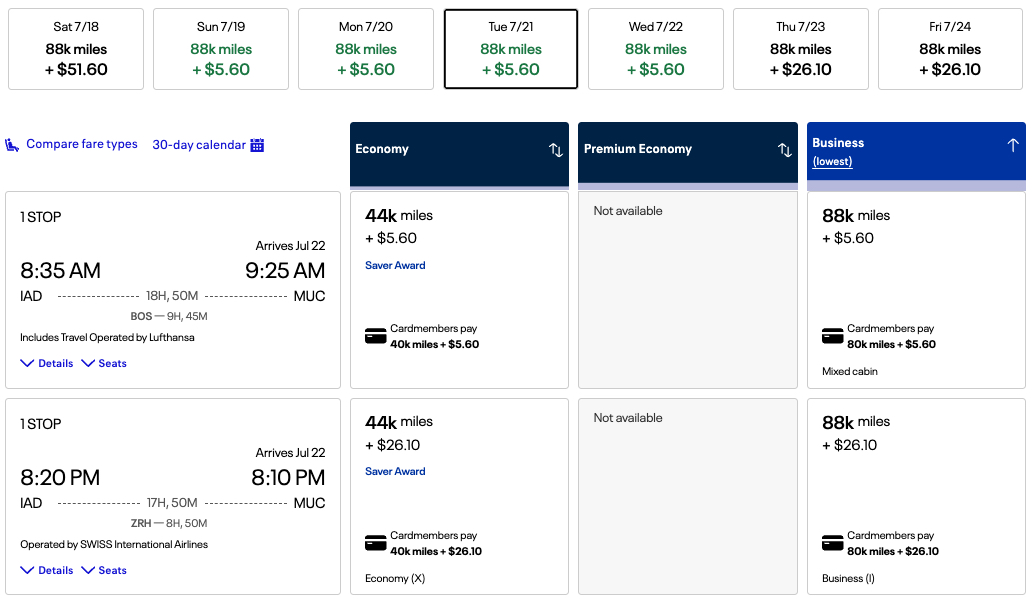
As you can see in this example, when I filter for nonstop flights and choose a flight on July 21st, which shows a price of 88,000 miles in business class on the calendar, it only shows me a 200,000-mile option in the list of flights.
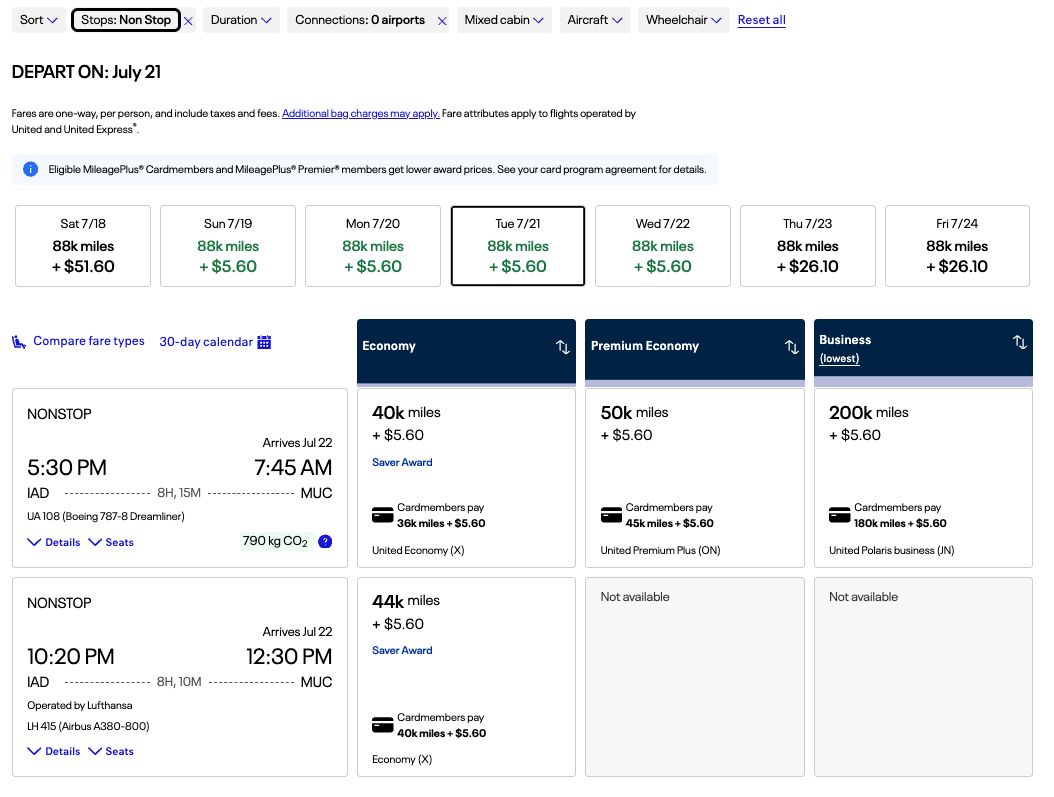
This is because the filters at the top only apply to the list of flights below for the exact date selected in the calendar. The 88,000-mile rate shown in the calendar view is for connecting flights, with layovers of close to 10 hours in some cases.
This means it'll take trial and error to find the best flights. If you want help pinpointing nonstop award availability, you'll often have better luck searching with Avianca's LifeMiles calendar first, then searching those exact dates on United's site to book with United miles.
Finding International First Class Awards
Looking for a last-minute trip in Lufthansa First Class or the elusive ANA First Class using your United miles?
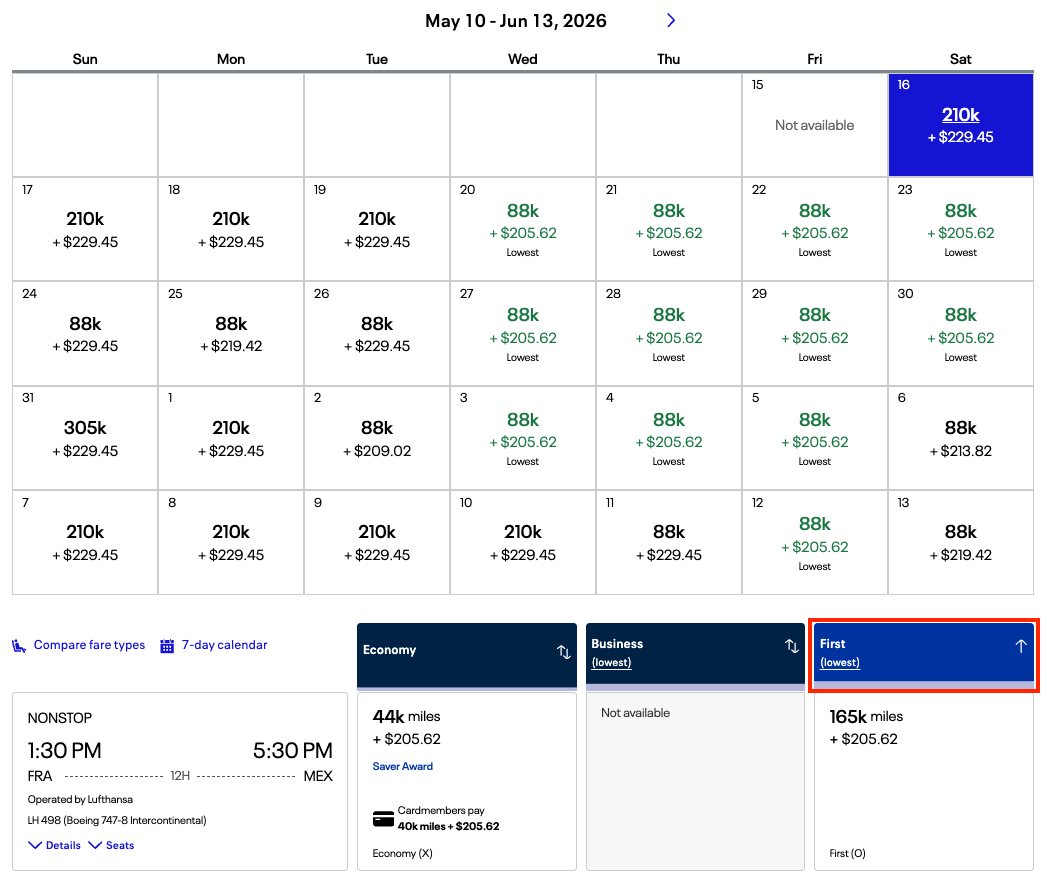
First, you'll need to be extremely lucky: Both airlines have gotten increasingly stingy with first class award availability. Lufthansa only releases first class seats a few days before departure at most. ANA is more sporadic, and it's almost always just one seat per flight for ANA First Class awards.
But if you're searching for these international first class awards on United's site, it's important to remember that the calendar view won't display first class prices for international flights. Instead, you'll need to search day-by-day and look for the option to sort by first class in the list of flights.
Step 3: Select a Date & Use Filters to Find the Best Flights
Even though they don't apply to the calendar view, United's site offers a robust set of filters to narrow your flight choices when searching for exact dates.
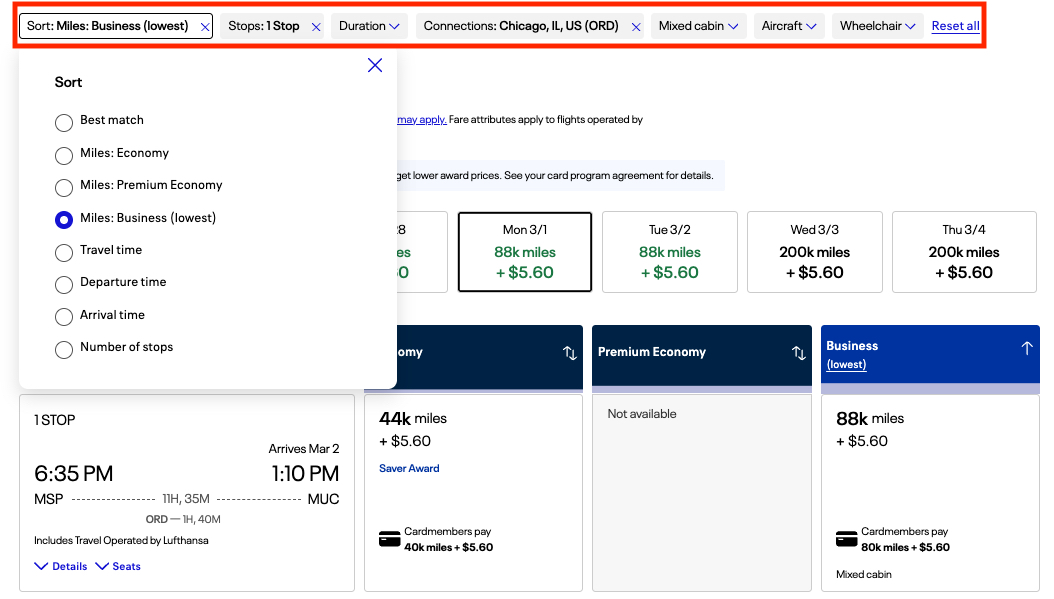
You can choose to sort by cost, travel time, or departure time, and filter by number of stops, duration, connecting airports, and more.
This can be especially helpful if you're trying to book connecting flights. In this example from Minneapolis (MSP) to Munich (MUC), I filtered for connections in Chicago (ORD) as that is a preferred connection point on this trip.
Some airlines have a variety of seat configurations depending on the type of plane you're flying – especially Lufthansa.

One of the most unique filters is the ability to only see flights on specific aircraft. This can help if you want to find flights with a more comfortable seating layout, such as Lufthansa business class on its 787 Dreamliner.
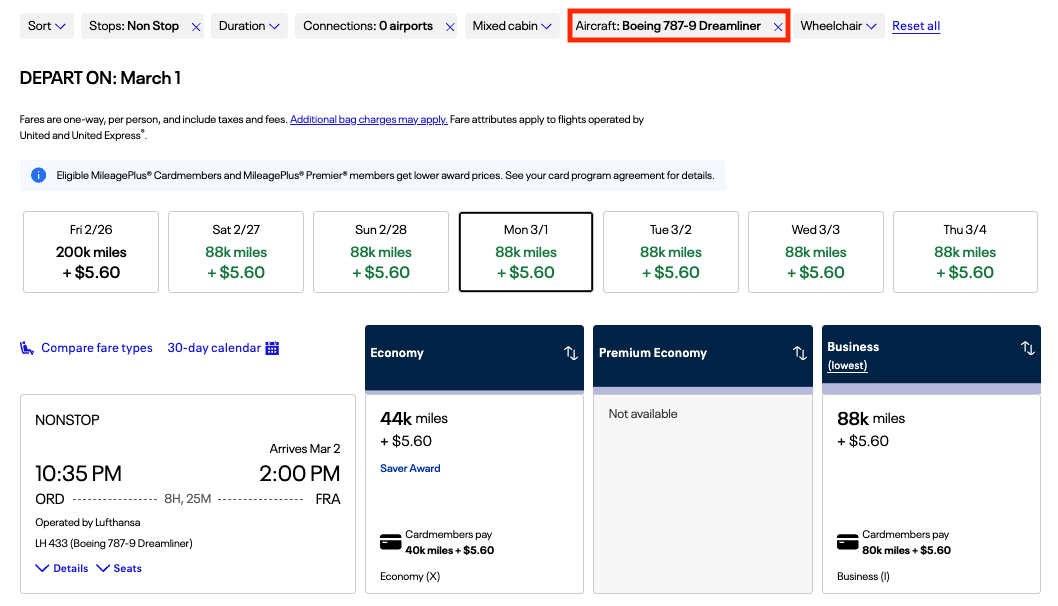
Just know: United's site may default to showing you a United flight at the top of the list … and it may not be the best price.
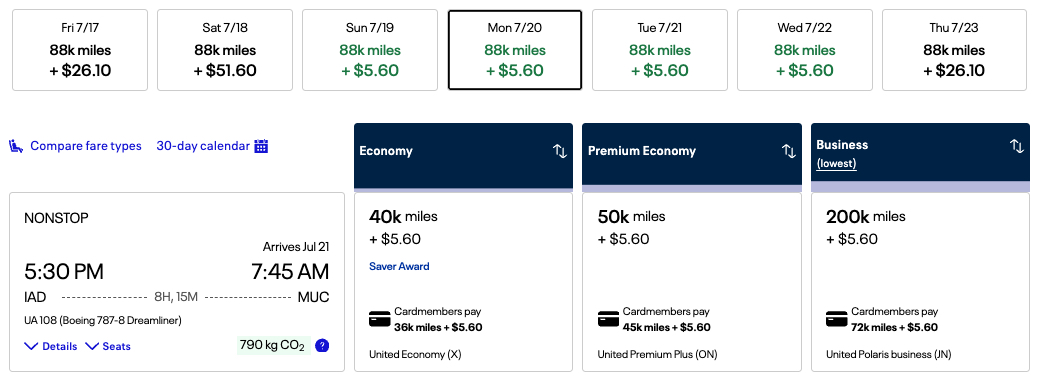
If you want to quickly see the lowest price in each cabin, just click the blue bar at the top of the corresponding column until the lowest prices appear at the top.
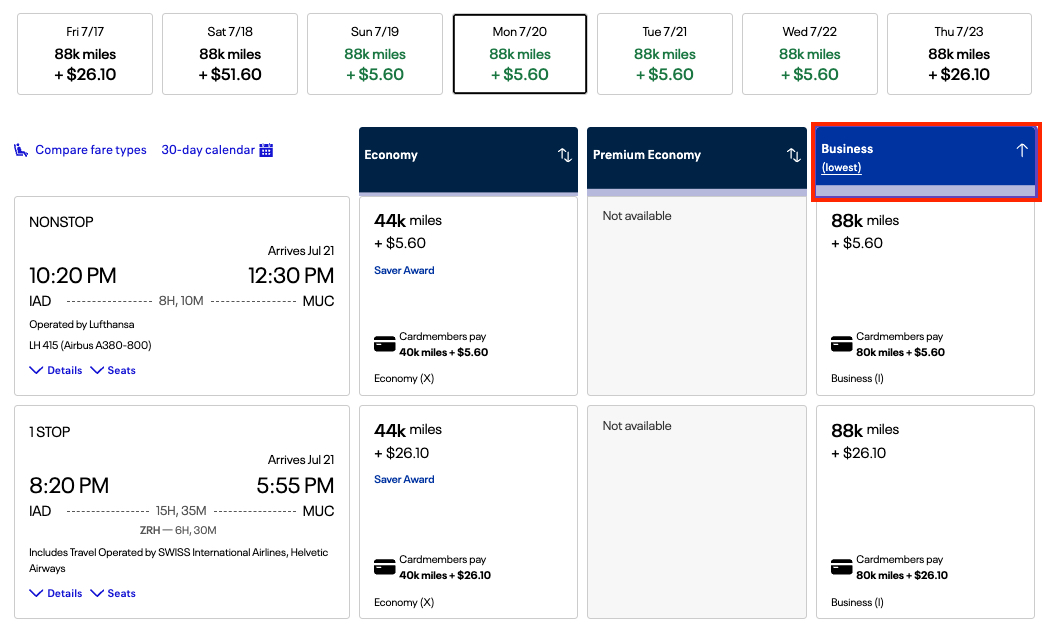
Step 4: Choose Your Flights, Transfer Points & Book!
Once you've found flights you like, it's time to book!
If you click “Details” for a specific flight, you'll get more information, including meals offered, flight numbers, aircraft information, and the class of service for each segment.
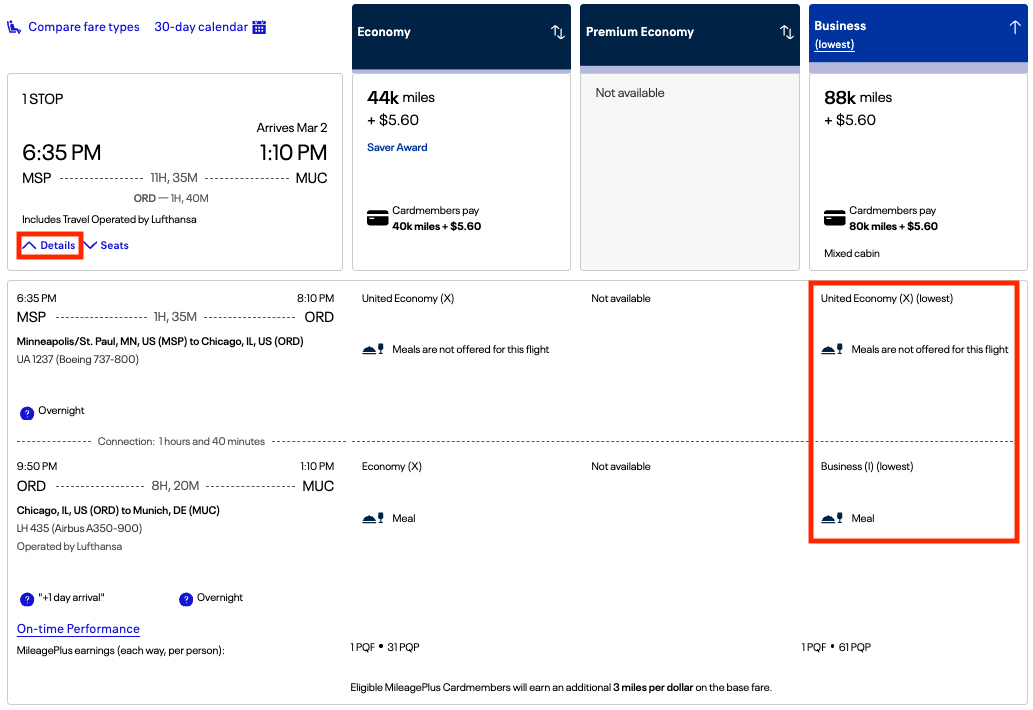
For United flights, you can see a seat map by clicking “Seats” on this screen before you proceed with the booking. And United doesn't offer basic economy award tickets (yet) – so your choice of seat is always included on United flights when booking with miles.
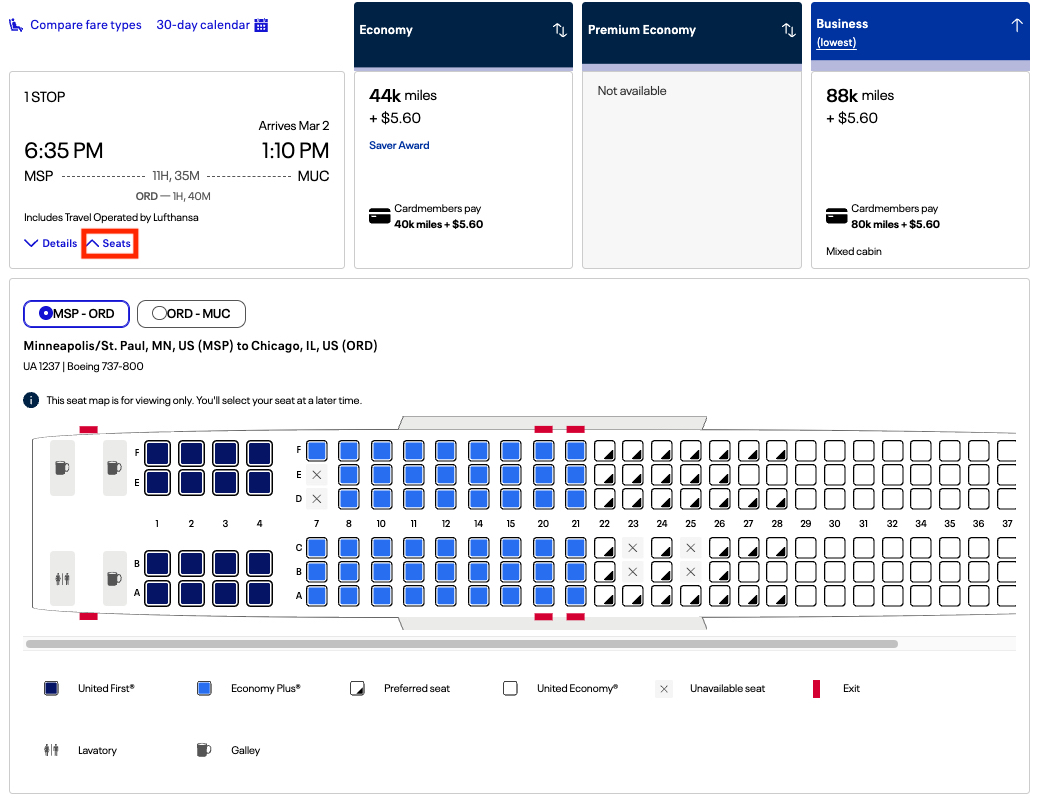
If one of your flights is operated by a partner airline, you may need to choose your seat after booking, either by entering your confirmation number on the operating airline's website or by phone, and there may be a fee depending on the airline and class of service.
Read more: Struggling to Pick Seats for Your Award Flight? Read This
Once you've selected a flight, just click through, enter your traveler information, and book. If you need to transfer points from Bilt or Chase, it's usually instant.
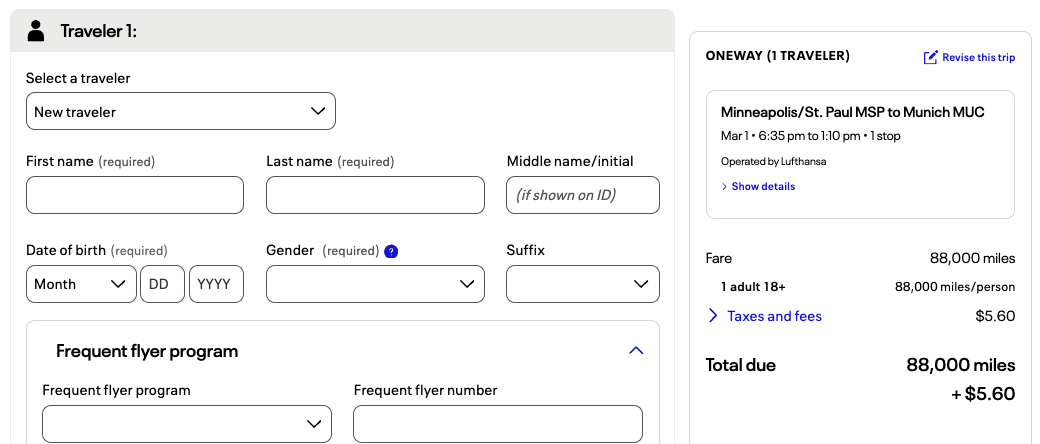
One of the best things about booking with United miles is that your ticket is fully refundable: There are no change or cancellation fees. This means you can book something now and get your United miles back later if plans change.
Discounts for United Cardholders
United has taken a page from Delta's book … and put it on steroids.
While United has long offered expanded “saver” award availability – or the cheapest award rates – to United co-branded cardholders, it recently began offering a minimum 10-15% discount on all United-operated award flights for cardholders, similar to Delta's TakeOff 15 benefit.
Unlike Delta, United cardholders also get discounted award rates on flights operated by partner airlines when booking with United miles. This is roughly a 9% discount. For example, a partner airline flight, such as Lufthansa, from the US to Europe normally costs 88,000 miles one way. But United cardholders can book those flights for 80,000 miles.
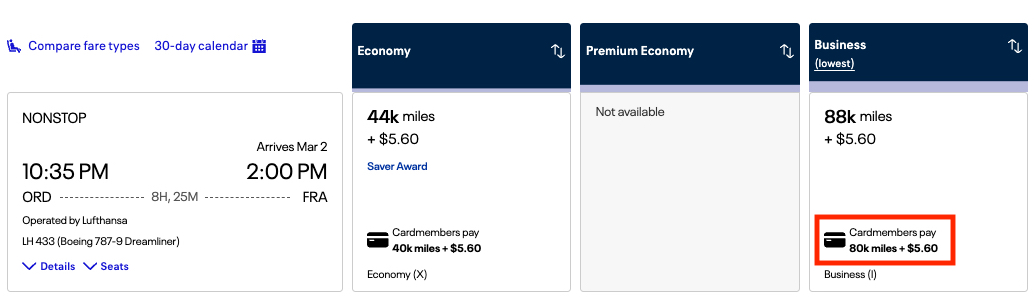
But where this really shines is that cardholders can now stack these two benefits when flying United – both expanded award availability plus an additional discount. This means cardholders can get mind-boggling savings compared to what non-cardholders would pay.
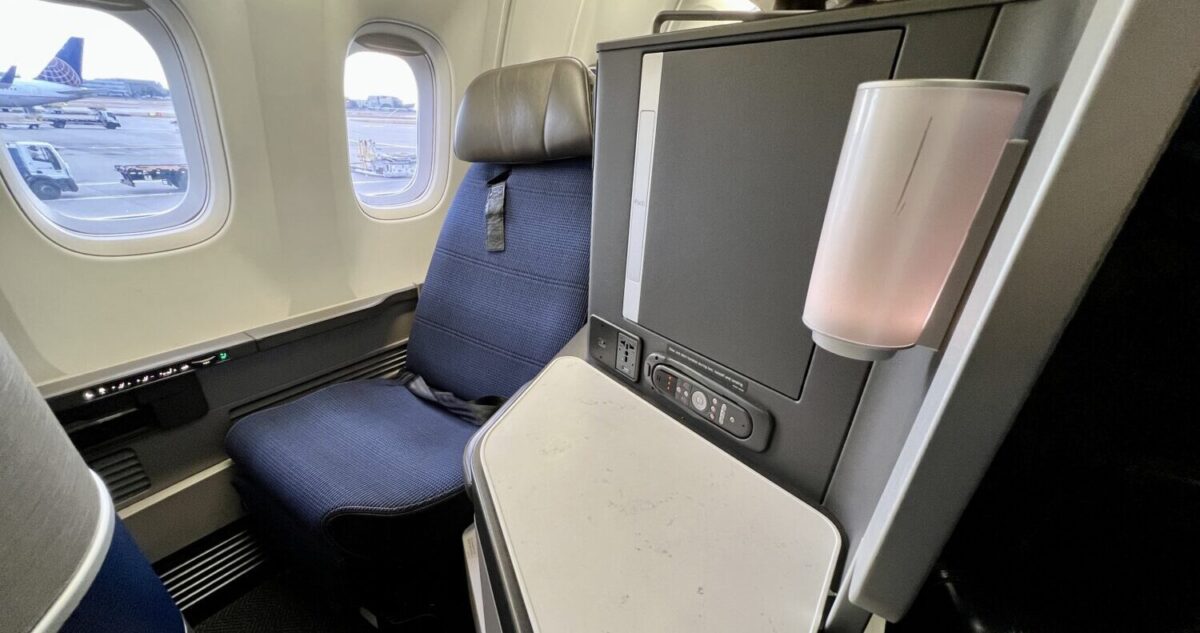
For example, a United cardholder would only pay 90,000 United miles for this United Polaris business class flight from Los Angeles (LAX) to Tokyo-Narita (NRT), while regular folks would need to pay 250,000 – a whopping 64% savings!
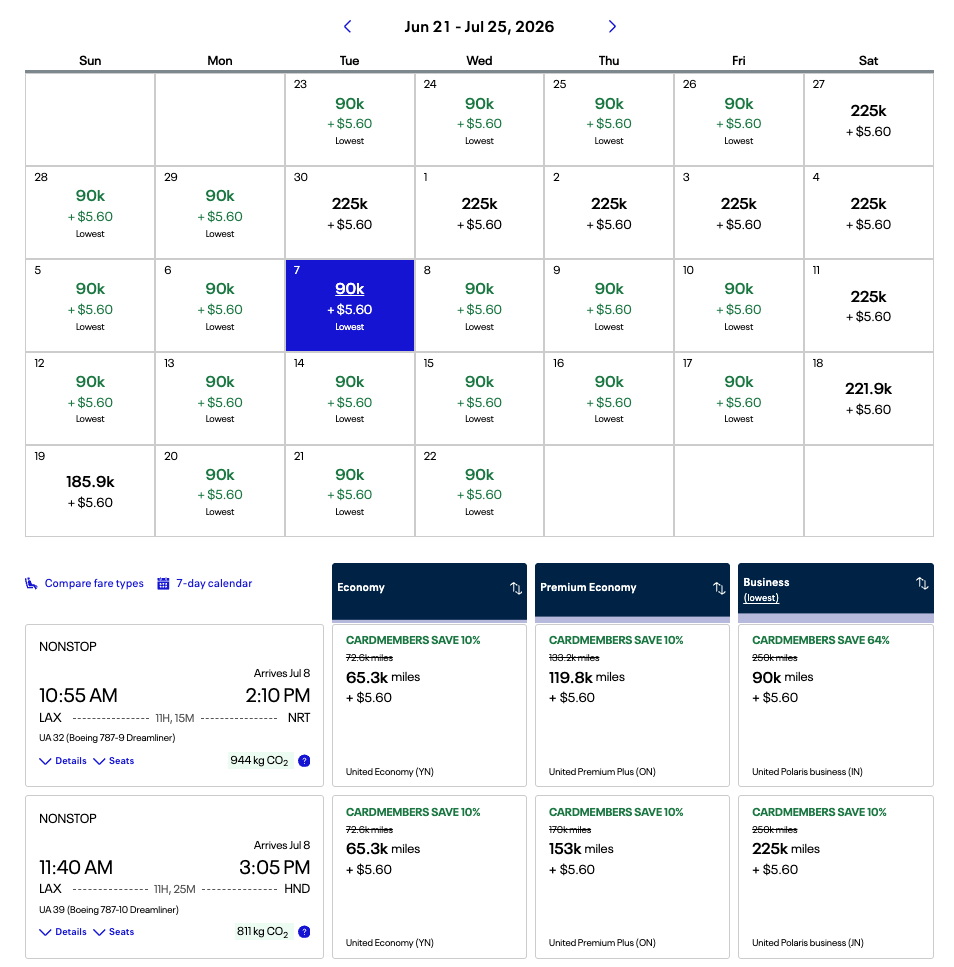
This is a great example of expanded award availability and the extra discount in effect. The flight to Tokyo's Narita Airport (NRT) has the expanded “saver” award availability for cardholders, while the flight to Haneda Airport (HND) doesn't. Both flights still get the 10% discount.
Meanwhile, non-United cardholders will only see the higher 250,000-mile rate for either flight.
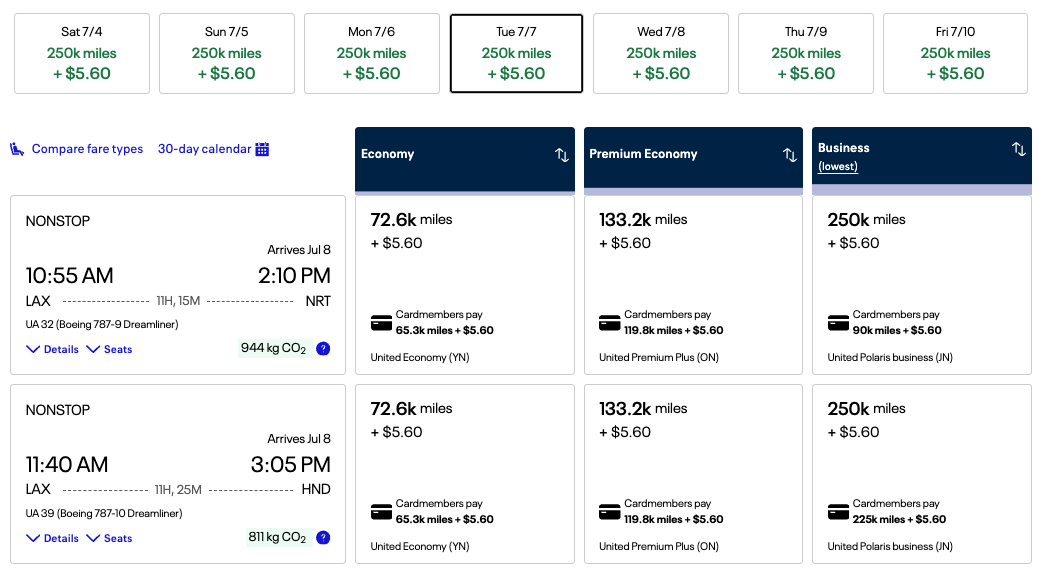
Long story short, if you want to fly United Polaris business class, it's now practically essential to hold a United card and book with United miles to get the best deal.
Bottom Line
United.com is a great place to start your search for award availability on United or its Star Alliance partners. While it's not as user-friendly as it used to be, it still offers some essentials for finding the best flights – a monthly calendar view and a robust set of filters.