



American Express just added a fantastic new Amex Offer to help you earn some extra Membership Rewards points on your Amazon purchases: Spend $50 or more with Amazon and you'll earn 500 bonus Membership Rewards points. And you can do it three times between now and July 19, racking up 1,500 Amex points for $150-plus in purchases.
Amex typically treats the spending threshold as a running total. This means you could make several small purchases to reach the $50 mark – or go big (not really that big) with a $150-plus Amazon order and earn the full 1,500 points in the process.
Just keep in mind, Amex Offers like these are targeted, so not everyone will see them in their accounts. And you need an American Express card like *amex platinum* or the *amex gold* that earns Membership Rewards points – co-branded Delta SkyMiles and Hilton Honors cards won't cut it.

Additionally, there are reports of different versions of this offer, such as spending $150 or more to earn 1,200 Membership Rewards points, up to 3 times. Check your Membership Rewards earning Amex card to see if you're targeted and which version you have!
This Amex Offer doesn't expire until July 19, so you've got nearly two months to use it. However, we often see Amex pull these offers quickly, so check your Amex card and add it ASAP if you see it.
Where to Find Amex Offers
If you haven't used Amex Offers before, think of them as digital coupons exclusively for Amex cardholders for purchases like airfare or hotels, as well as dining, entertainment, or everyday shopping. Add one of these to your Amex card, use that card to make an eligible purchase, and Amex will give you money (or points) right back for the discount within a few days as a statement credit on your account.
To check if you're targeted, simply log in to your American Express app and scroll down near the bottom of the screen. There should be a box called “Offers”.
If you're using the desktop version of the American Express website, you'll find Amex Offers about halfway down the homepage. Here, you can view all the Amex Offers that are currently available, see which ones you've already added to your card, and even review your lifetime savings with the Amex Offers program.
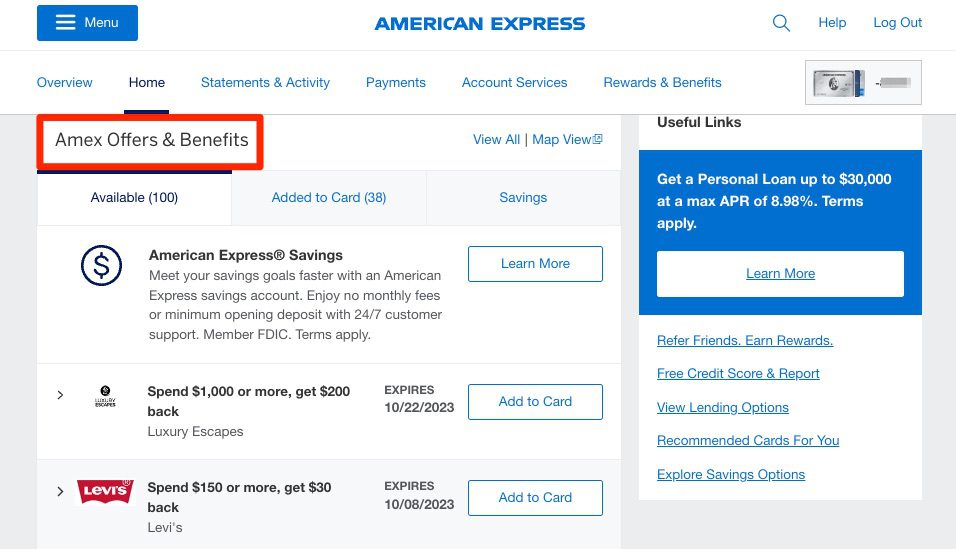
Just remember that if you have multiple Amex cards, you'll need to toggle through them all, since the offers will differ for each card. If you see an offer you like, simply add it to the card and make a qualifying purchase at that business with your card. You should receive a statement credit for the offer within a few days of making a purchase.
Thrifty Tip: Amex displays a maximum of 100 offers at a time. If you're not seeing the one you want, try adding a handful to your card, logging out, and then logging back in to see if you get some new ones!
Not familiar with Amex Offers? See our complete guide to using Amex Offers.
Bottom Line
This is a great way to earn some bonus points on your upcoming Amazon shopping.
If you see it in your account, add this offer to your cards now before it disappears – and make your Amazon purchases before July 19 to get those bonus points!






Wow thank you for answering my question. I thought it was just $200+ in ONE transaction but I had like $150 charge, then a few other charges that went over $200. I thought I wouldn’t get credit for it. But regardless, I feel like I should be credited no matter how you slice the $200 cause its all the same.
are travel cards really any better than just having a visa card that gives you 1%, and I just cash in the money each year
If you plan to travel, you’ll simply get more value out of points than getting straight cash back.